
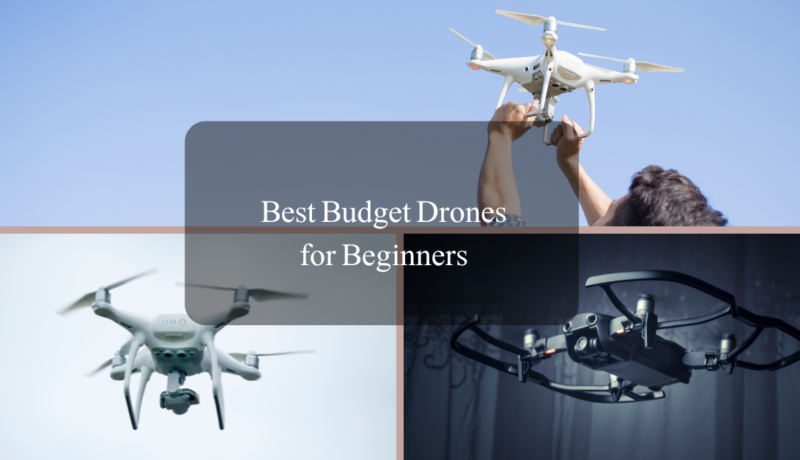

If you are new to drones and don’t want to spend hundreds of dollars on your first flight, you are in the right place. Choosing the best budget drones for beginners can be confusing, especially when many low-cost drones promise advanced features but fail to deliver real value.
Table Of Content
- How to Choose the Best Budget Drones for Beginners
- 1. Flight Stability and Ease of Use
- 2. Camera Quality and Purpose
- 3. Battery Life
- 4. Durability and Safety
- 5. Regulatory Compliance
- 6. Price vs Features
- Top 5 Budget Drones for Beginners (2026 Picks)
- 1. DJI Mini 2
- 2. Holy Stone HS720
- 3. DJI Flip
- 4. DJI Neo
- 5. Drone J1
- Key Features to Look for in a Beginner Drone
- Drone Safety Tips for Beginners
- Top 5 Beginner-Friendly Drones for YouTube Videos in 2026
- Beginner Flying Tips & Tricks for YouTube Content Creators
- 1. Understand Your Drone Before Flying
- 2. Start with Open Spaces
- 3. Check Local Drone Laws
- 4. Use Beginner Flight Modes
- 5. Plan Your Shots Before Recording
- 6. Mind the Lighting
- 7. Keep Extra Batteries Handy
- 8. Edit Your Videos Professionally
- 9. Learn from Tutorials and Guides
- Camera Settings & Video Tips for YouTube Drones
- 1. Resolution & Frame Rate
- 2. ISO Settings
- 3. Shutter Speed
- 4. White Balance
- 5. ND Filters
- 6. Camera Angles & Composition
- 7. Smooth Movements
- 8. Plan & Storyboard Your Shots
- 9. Editing Tips for YouTube
- 10. Reference & Learn from Experts
- Final Words
In 2026, beginner-friendly drones are safer, easier to control, and more affordable than ever. Many budget models now offer features like altitude hold, headless mode, one-key takeoff, and durable designs that help first-time pilots learn without stress or frustration.
This guide is specially created for USA beginners who want a reliable drone that is easy to fly, safe for learning, and priced within a reasonable budget. Whether you are buying your first drone for practice, gifting one to a beginner, or simply exploring drone flying as a hobby, this article will help you make a confident choice.
We have carefully researched and tested beginner-focused models to highlight drones that offer real performance, safety, and value for money. You will also learn what features matter most for beginners, common mistakes to avoid, and how to choose the right drone based on your needs.
How to Choose the Best Budget Drones for Beginners
Choosing the best budget drones for beginners isn’t just about picking the cheapest option. You want a drone that is easy to fly, safe, and reliable, while also offering features that make learning fun and frustration-free. Here’s what you should consider before making a purchase:
1. Flight Stability and Ease of Use
Beginner drones should have features like altitude hold, headless mode, and one-key takeoff/landing. These features help new pilots fly confidently without worrying about crashes or losing control.
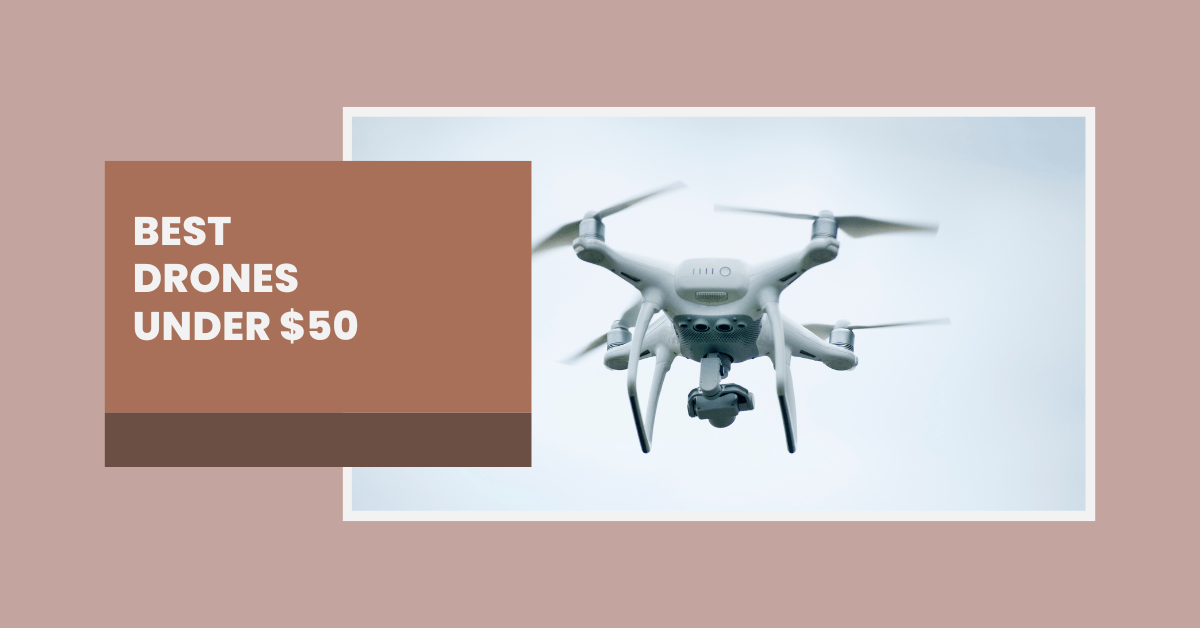
For more tips on beginner-friendly drones, check out our guide on Best Drones Under $50.
2. Camera Quality and Purpose
If your goal is to capture photos or videos for YouTube or social media, look for drones that offer HD or 4K cameras even in a budget model. For content creators, see our detailed post on Best Drones for YouTube Videos to understand what features matter most.
3. Battery Life
Flight time matters! Budget drones usually offer 10–30 minutes per charge. Make sure your choice allows enough flying time to practice and explore without frequent interruptions.
4. Durability and Safety
For beginners, crashes are normal. A drone with propeller guards, robust build, and easy replacement parts will save you both money and frustration. Always check reviews before purchasing.
5. Regulatory Compliance
Even for small drones, it’s important to follow FAA rules in the USA. If you’re flying in California or other states, check our guide on Drone Laws in California to stay safe and legal.
6. Price vs Features
The best budget drones for beginners strike a balance between affordability and useful features. Don’t compromise safety for a lower price—choose a model that gives real value.
Top 5 Budget Drones for Beginners (2026 Picks)
Finding a beginner-friendly drone that is both affordable and reliable can be tricky. After thorough research and testing, here are the best 5 drones that offer safety, ease of flight, and value for money.
1. DJI Mini 2
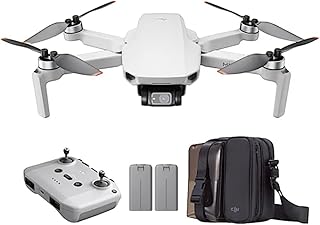
- Price: $299–$499
- Flight Time: Up to 31 mins
- Camera: 4K Video
- Best For: Beginners seeking stable flight & high-quality video
| Pros | Cons |
|---|---|
| Stable flight for beginners | Higher price compared to other budget drones |
| High-quality 4K camera | No obstacle avoidance in budget package |
| Lightweight & foldable design | Extra batteries may be needed for extended flight |
2. Holy Stone HS720
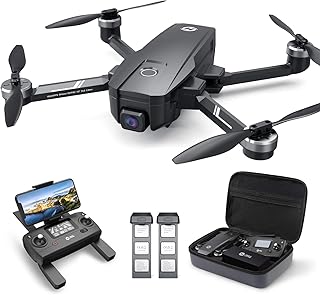
- Price: $99–$329
- Flight Time: Up to 26 mins
- Camera: 4K Video
- Best For: Budget-conscious beginners wanting GPS support
| Pros | Cons |
|---|---|
| GPS assisted flight | Slightly heavier design |
| Durable build | Learning curve for advanced features |
| Good 4K camera for beginners | May need extra batteries for longer flights |
3. DJI Flip
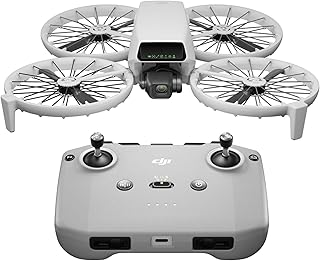
- Price: $299–$449
- Flight Time: Up to 28 mins
- Camera: 4K Video
- Best For: Beginners wanting fun flight modes & camera quality
| Pros | Cons |
|---|---|
| Fun flips and tricks | Shorter flight time compared to some competitors |
| High-quality camera | Price slightly higher for beginners |
4. DJI Neo
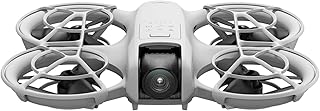
- Price: $199–$299
- Flight Time: Up to 25 mins
- Camera: HD / casual photos
- Best For: Absolute beginners & travelers
| Pros | Cons |
|---|---|
| Compact and lightweight | Camera quality not as high as 4K models |
| Easy to carry for travel | Flight time shorter than bigger drones |
5. Drone J1
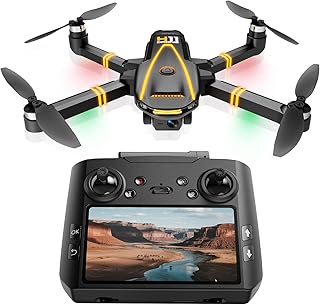
- Price: $99–$129
- Flight Time: Up to 15 mins
- Camera: Basic HD
- Best For: First-time flyers & casual beginners
| Pros | Cons |
|---|---|
| Very affordable for beginners | Short flight time |
| Lightweight and easy to fly | Camera is basic HD only |
Key Features to Look for in a Beginner Drone
When buying your first drone, it’s important to focus on safety, ease of use, and camera quality. Here’s what you should check:
- Stability & GPS Support
A drone with GPS stabilization is perfect for beginners because it holds its position even in windy conditions. This prevents crashes and helps you focus on flying smoothly. - Camera Quality
For content creation, a 4K camera is great, but if your budget is tight, HD cameras are still sufficient for practice and casual footage. Check out our Best Drones Under $50 guide for budget-friendly options. - Flight Time
Beginners often underestimate battery life. A drone that flies at least 20–30 minutes per battery is ideal. Shorter flights may require extra batteries, like the DJI Mini 2. - Durability & Design
Look for drones with foldable arms and durable frames. This ensures your drone survives minor crashes and is easy to transport — perfect if you’re traveling or taking it outdoors. - Beginner-Friendly Modes
Features like altitude hold, one-button takeoff/landing, and beginner mode make flying easier and reduce frustration. Drones like Best Foldable Drones for Beginners have these features.
Drone Safety Tips for Beginners
Flying a drone safely is not just a legal requirement, but also ensures your drone lasts longer. Follow these essential safety tips:
- Check Local Drone Laws
Before flying, understand drone regulations in your area. For example, in the USA, check the FAA rules: Check The Rules Here.
If you are in California, our Drone Laws in California article explains everything in detail. - Avoid Crowded Areas
Never fly near people, pets, or traffic. Beginner drones are light, but collisions can still cause damage. - Start Indoors or in Open Spaces
Practice flying in a safe indoor space or an open field with few obstacles. Check out our Best Indoor Drones for Beginners post for options suited for indoor practice. - Always Keep Line of Sight
Never fly your drone out of sight. This ensures you can control it and avoid accidents. - Battery & Weather Awareness
Avoid flying in rain, snow, or strong winds. Always check your battery before flight and keep spare batteries ready.
Top 5 Beginner-Friendly Drones for YouTube Videos in 2026
| Drone | Price Range | Flight Time | Camera Quality | Best For | Pros | Cons | Buy Now |
|---|---|---|---|---|---|---|---|
| DJI Mini 2 | $299 – $499 | Up to 31 mins | 4K Video | YouTube content creators | Stable flight, excellent 4K camera, lightweight | Higher price for beginners | Buy Now |
| DJI Air 2S | $749 – $999 | Up to 31 mins | 5.4K Video | Advanced YouTube creators & travel vloggers | Top-notch camera, intelligent flight modes | Expensive, steep learning curve for beginners | Buy Now |
| Holy Stone HS720 | $99 – $329 | Up to 26 mins | 4K Video | Budget-conscious creators | Affordable, GPS enabled, foldable | Limited advanced features | Buy Now |
| DJI FPV Drone | $999 – $1,299 | Up to 20 mins | 4K 60fps Video | Action content creators & vloggers | High-speed flight, cinematic shots | Expensive, short flight time | Buy Now |
| Ryze Tello | $99 – $129 | Up to 13 mins | HD Video | First-time YouTube creators & educational use | Very affordable, easy to use, programmable | Short battery life, limited range | Buy Now |
Beginner Flying Tips & Tricks for YouTube Content Creators
Flying a drone for YouTube videos can be exciting, but it can also be tricky if you’re just starting out. Don’t worry — I’ll guide you step by step so you avoid common mistakes and make the most out of your drone.
1. Understand Your Drone Before Flying
Before you take off, spend some time learning your drone’s controls and features. Every drone behaves differently — even beginner-friendly ones like the DJI Mini 2.
- Practice basic movements: ascend, descend, rotate, and hover.
- Learn how to return your drone safely to avoid crashes.
- Read the manual; it’s tempting to skip it, but this can save your drone from damage.
2. Start with Open Spaces
When you’re starting, choose open areas like parks or empty fields. This reduces the risk of accidents and helps you focus on filming quality shots.
3. Check Local Drone Laws
Always follow your state’s drone laws. For example, if you’re filming in California, make sure to check Drone Laws in California.
- Fly below 400 feet.
- Avoid crowded areas.
- Respect privacy and no-fly zones.
4. Use Beginner Flight Modes
Most drones have beginner flight modes that limit speed and altitude. Activating these modes can help you control your drone better while learning.
- Hover and follow modes are great for steady shots.
- GPS-enabled drones like the Holy Stone HS720 help keep your drone stable even in windy conditions.
5. Plan Your Shots Before Recording
Think about the video you want to create before flying:
- Storyboard your shots.
- Decide camera angles and movements.
- Use smooth movements for cinematic effects — sudden jerks can ruin your footage.
6. Mind the Lighting
Lighting makes a huge difference in your YouTube videos:
- Shoot during golden hour (early morning or late afternoon) for warm, professional-looking light.
- Avoid shooting directly into the sun.
7. Keep Extra Batteries Handy
Drone batteries don’t last long — usually 20-30 minutes. Always carry extra batteries to continue filming without interruptions.
8. Edit Your Videos Professionally
Once you have your footage, edit it using software like Adobe Premiere Pro or Final Cut Pro. Adding smooth transitions, background music, and text overlays can elevate your content.
9. Learn from Tutorials and Guides
If you want to improve faster, check our detailed guides:
- Best Drones Under $50 for affordable options.
- Best Foldable Drones for Beginners for travel-friendly setups.
- Best Drones for Kids if you’re making family-friendly content.
Pro Tip: Don’t rush into advanced tricks like flips or high-speed maneuvers. Focus on creating smooth, cinematic shots first. Once you’re confident, you can gradually try advanced moves to make your YouTube content stand out.
Camera Settings & Video Tips for YouTube Drones
Creating stunning YouTube content with your drone isn’t just about flying — your camera settings play a huge role. Let’s dive into the key tips and settings to get professional-looking videos.
1. Resolution & Frame Rate
For YouTube, higher resolution gives better video quality:
- 4K resolution is ideal if your drone supports it (like DJI Mini 2).
- 1080p works fine for beginners or budget drones.
- Frame rate: 30fps for standard video, 60fps for smooth action shots or slow motion.
2. ISO Settings
ISO controls your camera’s sensitivity to light:
- Keep ISO as low as possible in bright daylight to avoid grainy footage.
- In low light, increase ISO carefully — too high will add noise to your video.
3. Shutter Speed
Shutter speed affects motion blur:
- Use the 180-degree rule: shutter speed = 2 × frame rate.
- For 30fps, set shutter speed around 1/60 sec for natural-looking motion.
4. White Balance
Set white balance according to your lighting:
- Sunny outdoors: “Daylight” mode.
- Cloudy or shade: “Cloudy” mode.
- Manual white balance is best for consistent color throughout your video.
5. ND Filters
Neutral Density (ND) filters reduce light entering your camera.
- Helps achieve cinematic motion blur.
- Essential for bright sunny days to avoid overexposed footage.
6. Camera Angles & Composition
Good shots grab attention:
- Rule of thirds: Keep the main subject off-center.
- Leading lines: Use roads, rivers, or trails to guide the viewer’s eye.
- Overhead shots: Capture landscapes and locations from unique perspectives.
7. Smooth Movements
Avoid jerky drone movements:
- Use gentle tilts and pans.
- Practice slow forward and backward movements.
- GPS-enabled drones help stabilize your shots for cinematic quality.
8. Plan & Storyboard Your Shots
Always plan your video before flying:
- Decide the sequence of shots.
- Mix wide, medium, and close-up drone angles for visual variety.
- Consider your background music and transitions while filming.
9. Editing Tips for YouTube
Once you have your footage:
- Use editing software like Adobe Premiere Pro, Final Cut Pro, or DaVinci Resolve.
- Color grade to enhance visual appeal.
- Add text overlays, smooth transitions, and background music to engage viewers.
10. Reference & Learn from Experts
If you want more tips, check out our guides:
Pro Tip: Always fly with proper lighting and practice your shots before recording the full video. Consistency in camera settings is key to professional content.
Final Words
Flying drones for YouTube videos can feel overwhelming at first, but once you get your camera settings, flight techniques, and editing workflow right, producing professional content becomes fun and rewarding.
Remember:
- Choose the right drone for your budget and skill level. (Best Drones Under $50, Best Foldable Drones for Beginners)
- Practice smooth movements and proper angles to make your shots cinematic.
- Optimize your camera settings — ISO, shutter speed, frame rate, and white balance — to get the best results.
- Plan your shots, storyboard your video, and edit carefully to engage viewers. (Best Drones for YouTube Videos)
By following these steps, you can create visually stunning YouTube videos that stand out from the crowd.
Ready to Take Off?
If you’re serious about creating amazing drone videos, start by picking the perfect drone today. Explore our detailed guides to find the best drones for beginners, kids, and YouTube content creators:
Get your drone, practice your shots, and join thousands of content creators making stunning aerial videos. Your journey to creating professional YouTube drone videos starts now!


No Comment! Be the first one.